DNS Explained: A Complete Guide from Basics to Enterprise Use
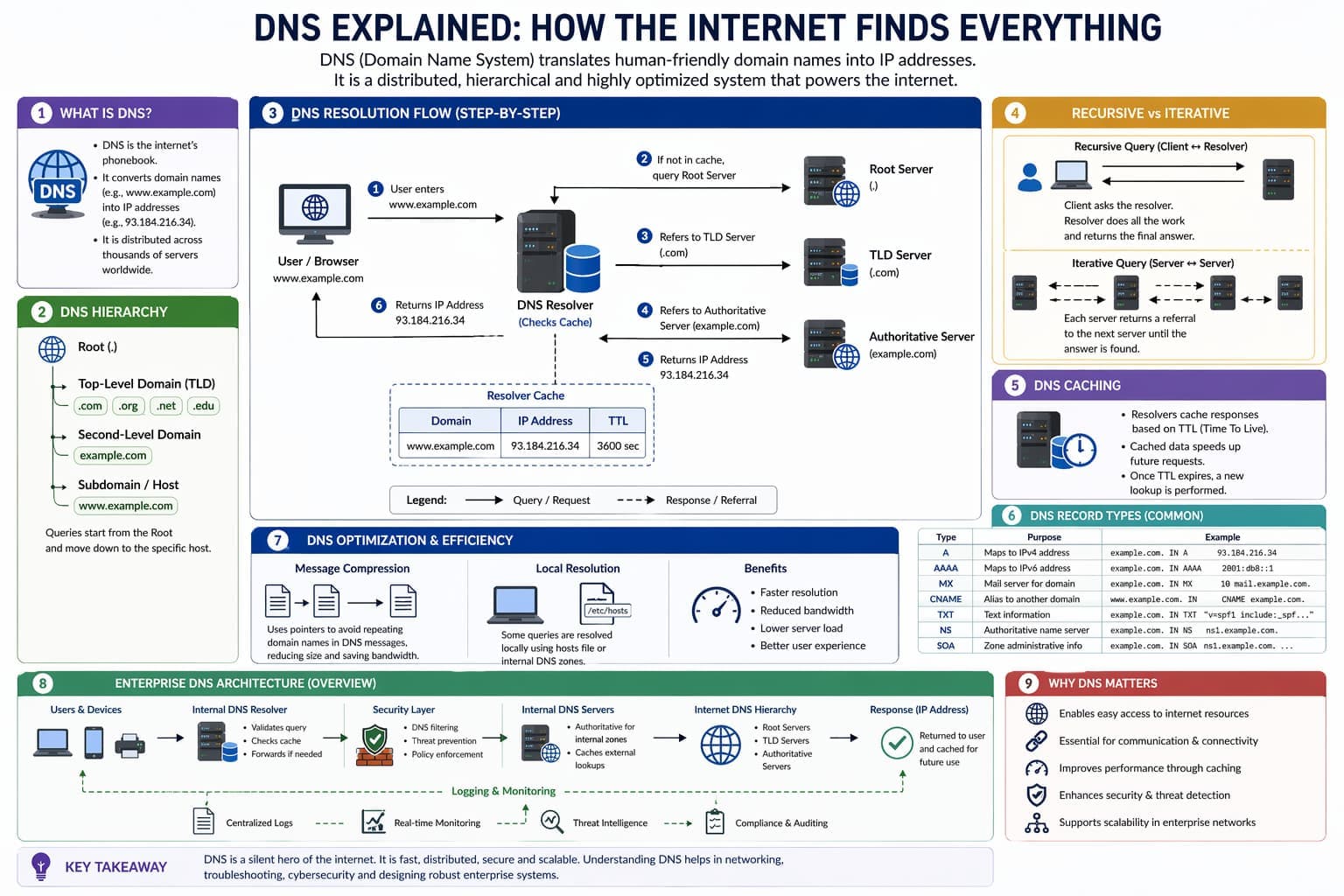
DNS is one of the most critical components of the internet. Without it, users would have to remember long strings of numbers instead of simple website names. This article explains DNS in a clear, structured, and practical way, from basic concepts to real-world enterprise usage.
Dishanth_R

Apr 21, 2026
1 Introduction
When you type a website address like www.google.com into your browser, your system performs a process that allows it to find the correct server on the internet. Computers do not understand domain names—they understand numerical IP addresses. The Domain Name System (DNS) is responsible for converting these human-friendly names into machine-readable IP addresses.
DNS is one of the most critical components of the internet. Without it, users would have to remember long strings of numbers instead of simple website names. This article explains DNS in a clear, structured, and practical way, from basic concepts to real-world enterprise usage.
2 What is DNS?
DNS (Domain Name System) is a distributed system that translates domain names into IP addresses.
For example:
- google.com → 142.250.x.x
Instead of remembering IP addresses, users rely on DNS to perform this translation automatically.
DNS works like a global directory. It does not store all information in one place but distributes it across multiple servers worldwide.
3 DNS Architecture: A Hierarchical System
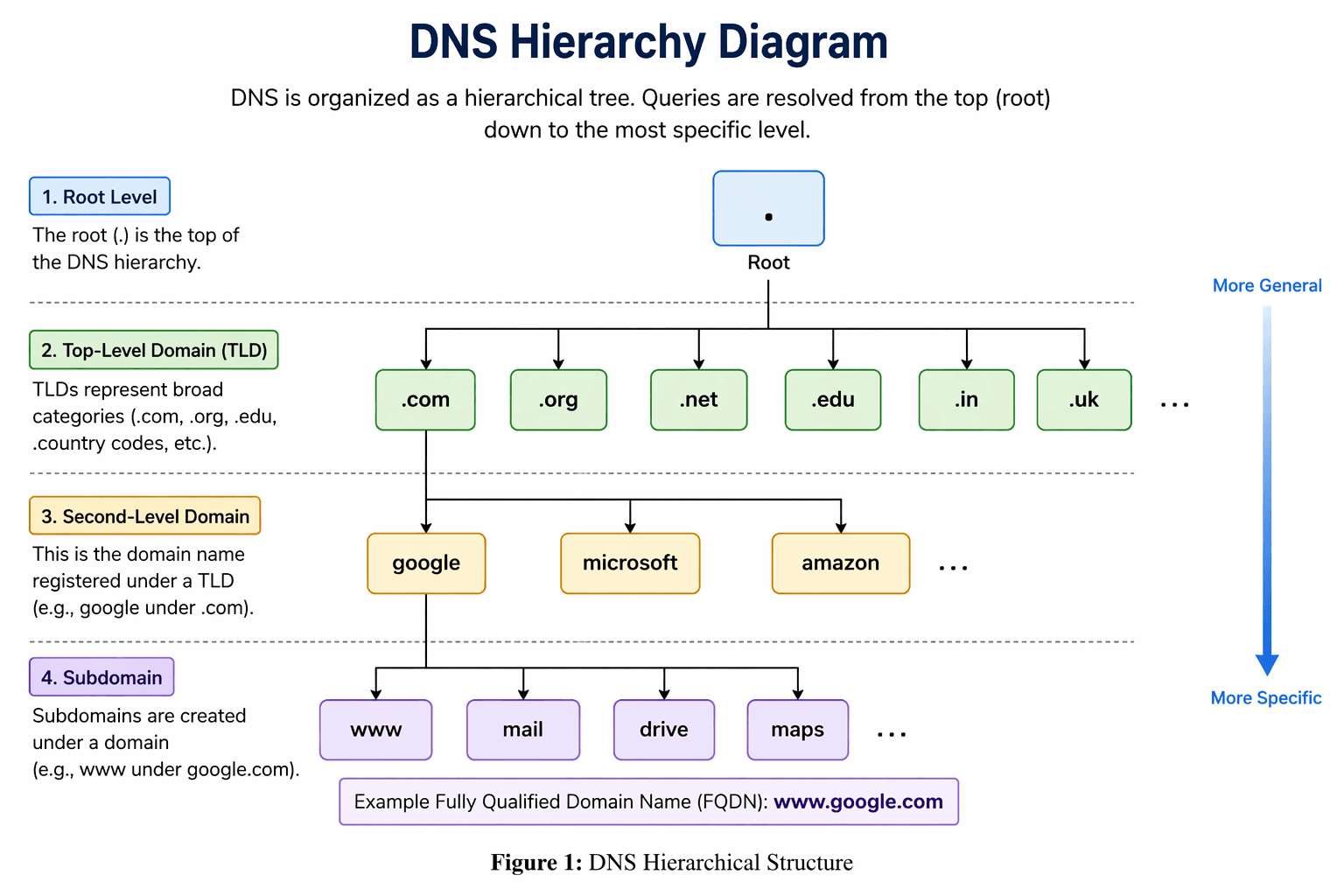
DNS is organized in a hierarchical structure, similar to a tree. This structure allows DNS to scale across the entire internet.
At the top is the root, followed by different levels of domain authority.
3.1 Structure of DNS
A domain name is made up of several parts:
- Root (.)
- Top-Level Domain (TLD) such as .com, .edu, .org
- Second-Level Domain such as google
- Subdomain such as www
For example:
www.google.com
This is interpreted as:
- Root → . → .com → google → www
DNS resolution always starts from the most general level (root) and moves toward the most specific level.
This hierarchical design ensures that no single server needs to store all domain information, making DNS efficient and scalable.
4 Key Components of DNS
DNS involves several important components that work together.
4.1 DNS Resolver
The resolver is the first point of contact when a user requests a domain.
It:
- Receives the query from the browser
- Checks cache or local files
- Sends requests to DNS servers if needed
Resolvers are usually provided by ISPs or configured locally.
4.2 Root Name Servers
Root servers are at the top of the DNS hierarchy.
They:
- Do not know the final answer
- Direct queries to the correct Top-Level Domain server
4.3 Top-Level Domain (TLD) Servers
TLD servers manage domain extensions such as:
- .com
- .edu
- .org
They guide the resolver to the correct authoritative server.
4.4 Authoritative Name Servers
These servers contain the actual DNS records.
They provide:
- Final IP address
- Accurate domain information
5 DNS Name Resolution Process
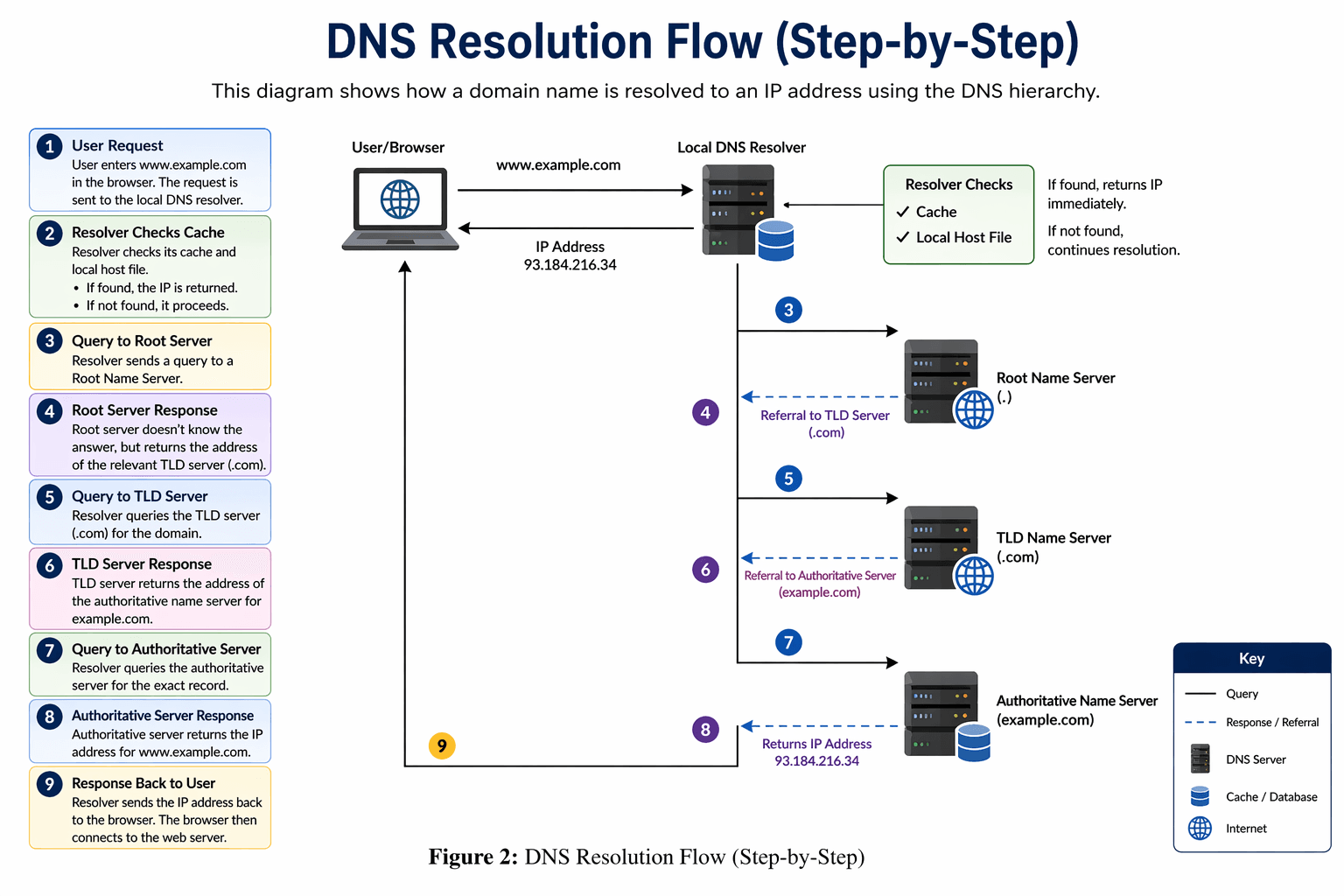
DNS resolution is the process of converting a domain name into an IP address.
Step 1: User Request
The user enters a domain name in the browser.
Step 2: Local Check
The resolver checks:
- Its cache
- Local host file
If the answer exists, it is returned immediately.
Step 3: Query to DNS Server
If no cached result is found, the resolver sends a request to a DNS server.
Step 4: Root Server Query
The DNS server queries a root server.
The root server responds with the address of the relevant TLD server.
Step 5: TLD Server Query
The DNS server queries the TLD server.
The TLD server returns the address of the authoritative server.
Step 6: Authoritative Server Query
The DNS server queries the authoritative server.
The authoritative server returns the IP address.
Step 7: Response to User
The resolver sends the IP address back to the browser.
The browser then connects to the website.
6 Recursive vs Iterative Queries
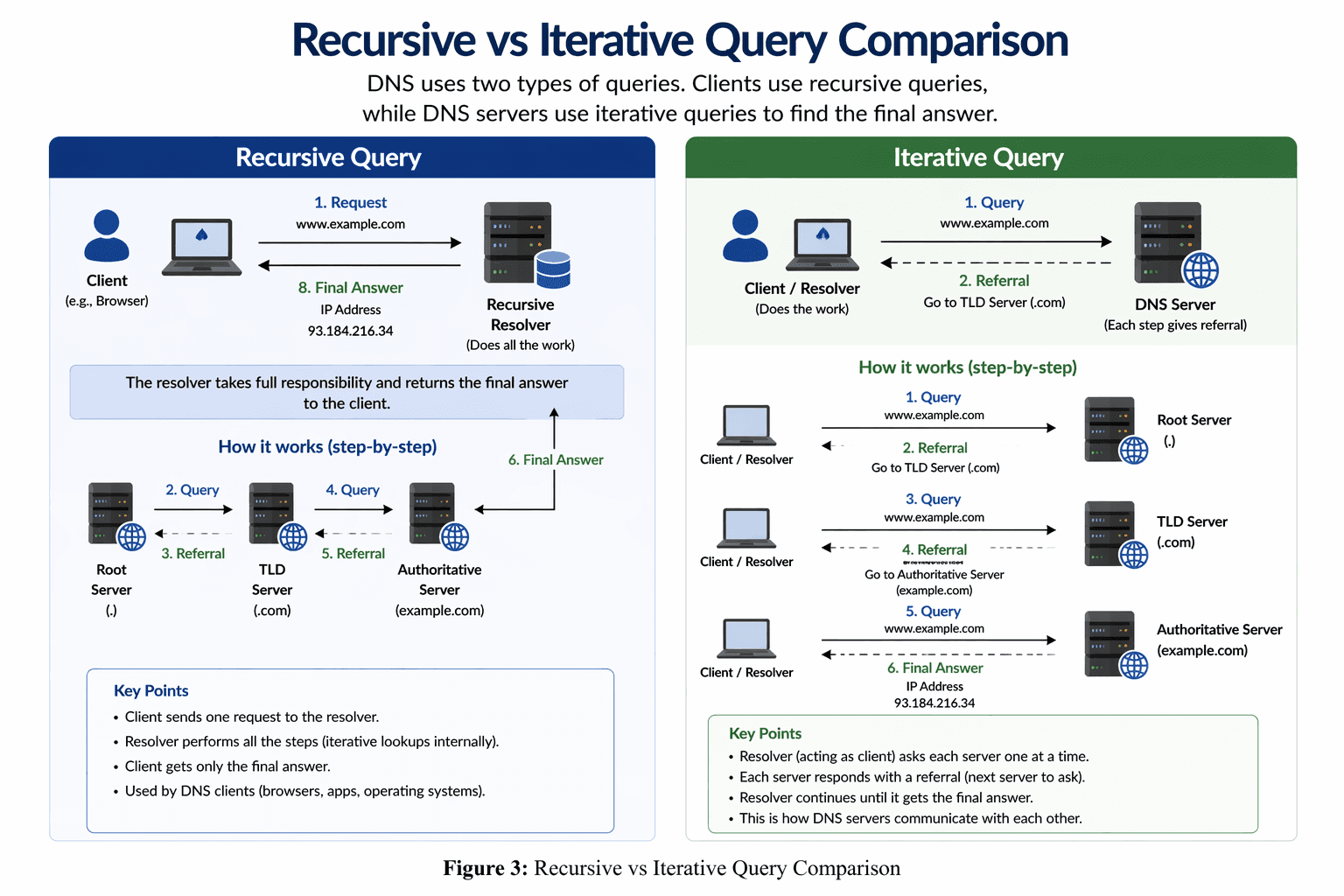
DNS uses two types of queries.
6.1 Recursive Query
- The resolver handles the entire process
- The client receives the final answer only
This is how browsers interact with DNS.
6.2 Iterative Query
- Each server provides a referral to another server
- The resolver follows each step
This is how DNS servers communicate internally.
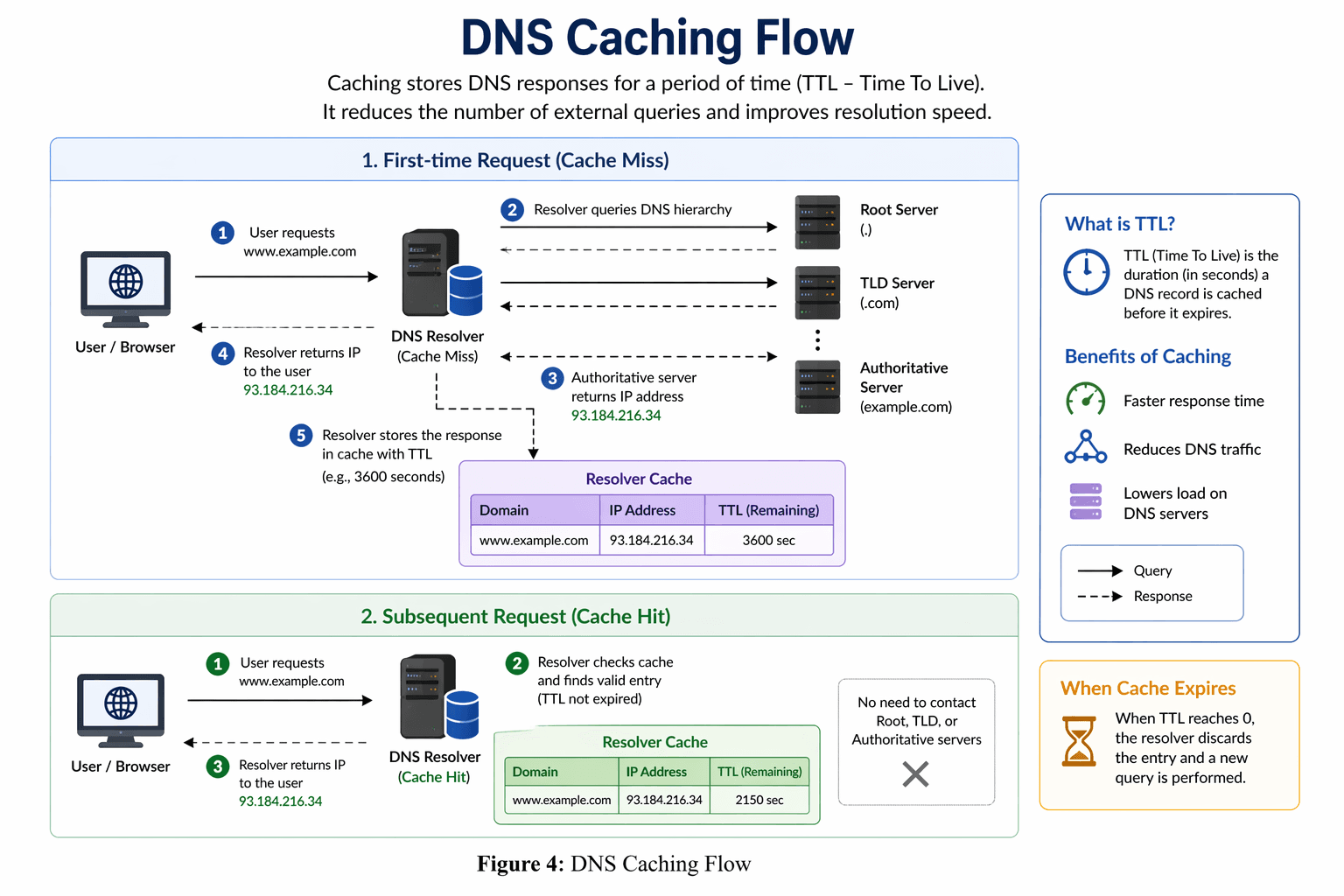
7 DNS Caching
Caching improves DNS performance.
When a resolver receives a response, it stores it temporarily.
7.1 Benefits of Caching
- Faster response time
- Reduced network traffic
- Less load on DNS servers
7.2 Time To Live (TTL)
Each cached record has a TTL value.
- Determines how long the record is stored
- Once expired, a new query is required
Caching occurs at:
- Resolver level
- DNS server level
7.3 Local Resolution
Sometimes DNS queries can be resolved locally.
For example:
- Internal company domains
- Entries in host files
This avoids unnecessary external queries and improves efficiency.
8 DNS Record Types
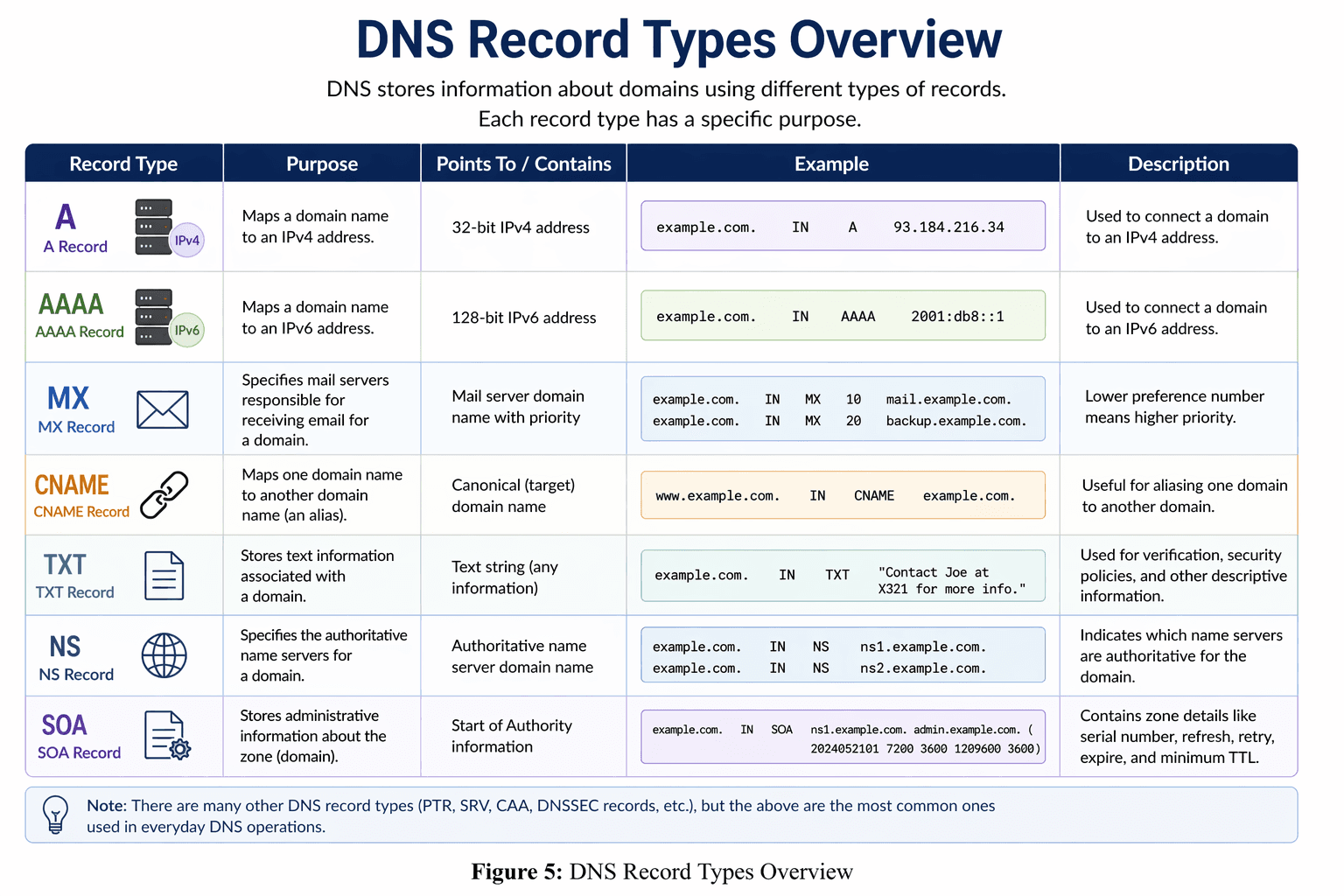
DNS stores information using different types of records.
A Record
Maps a domain to an IPv4 address.
AAAA Record
Maps a domain to an IPv6 address.
MX Record
Specifies mail servers for a domain.
It also includes priority values.
CNAME Record
Maps one domain name to another domain name.
Used for aliasing.
TXT Record
Stores text-based information.
Used for:
- Verification
- Security policies
- Metadata
NS Record
Specifies which servers are authoritative for a domain.
SOA Record
Contains administrative information about a domain.
Includes:
- Serial number
- Refresh interval
- Retry time
- Expiry time
9 DNS Master Files
DNS records are stored in text files called master files.
These files:
- Are created by administrators
- Use standard formats
- Are converted into binary format for DNS communication
Each line represents a DNS record.
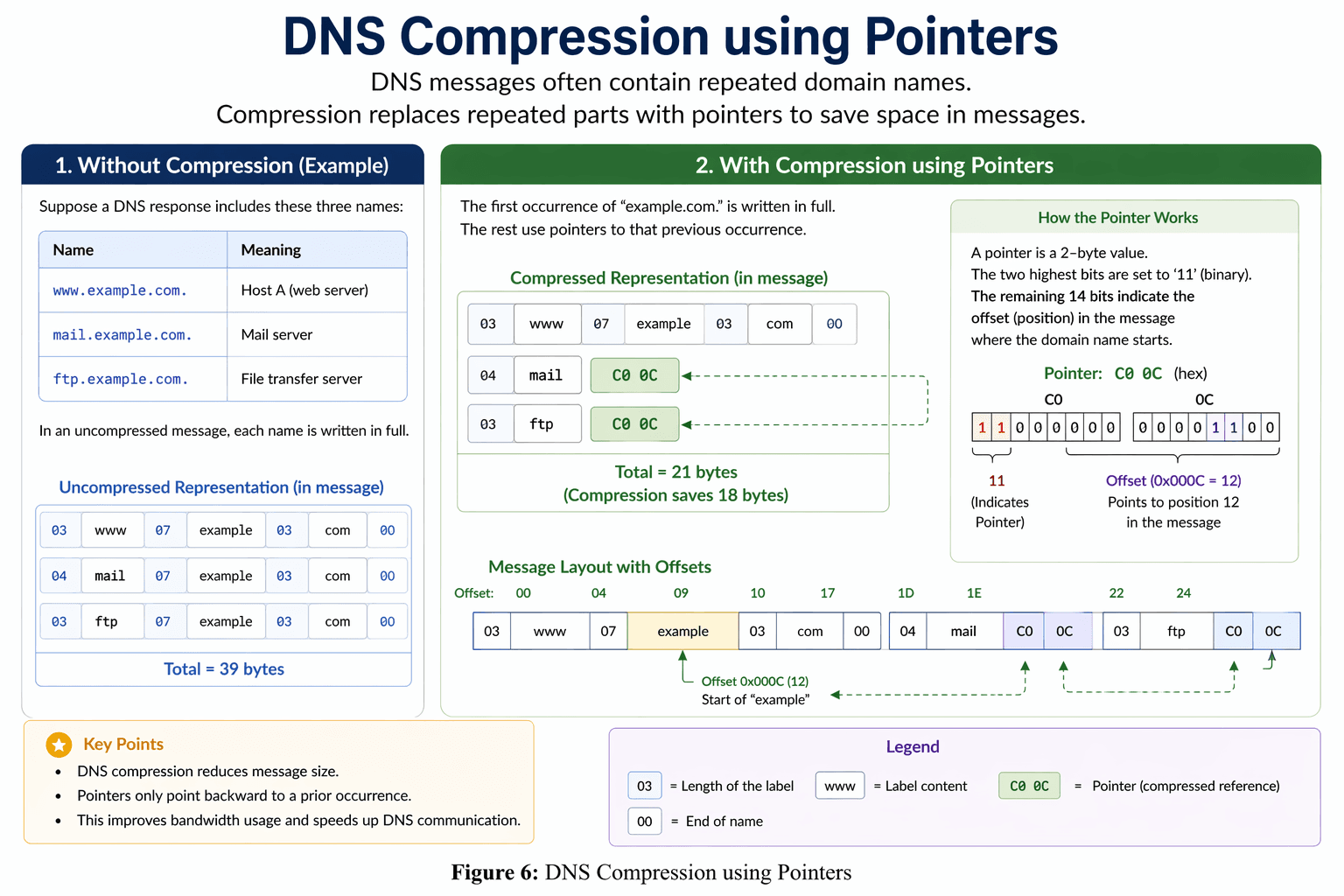
10 DNS Message Compression
DNS messages are designed to be efficient.
When domain names are repeated in a message, DNS uses pointers to avoid duplication.
How Compression Works
- The first occurrence of a domain name is stored fully
- Subsequent occurrences use pointers to refer back
Benefits
- Reduces message size
- Improves performance
- Saves bandwidth
This technique is especially useful in large DNS responses.
11 DNS and IPv6
With the introduction of IPv6, DNS required updates.
A new record type was introduced:
- AAAA record
This allows DNS to support 128-bit IPv6 addresses instead of 32-bit IPv4 addresses.
12 Enterprise DNS Architecture
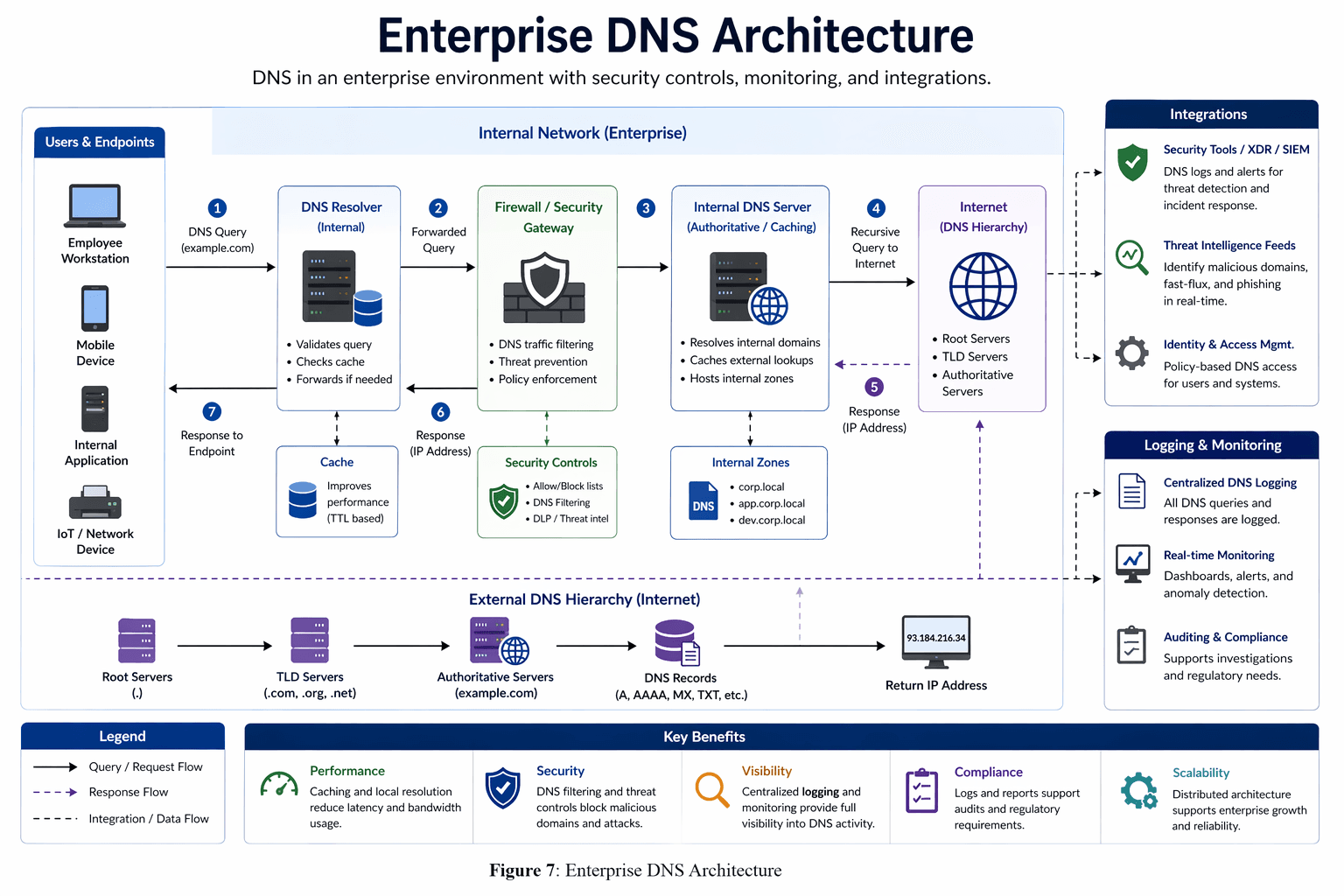
In real-world environments, DNS is more complex.
Organizations use DNS within structured networks that include security and monitoring.
12.1 Typical Enterprise Flow
- User device sends request
- Internal DNS resolver processes the request
- Firewall or security gateway inspects traffic
- Internal DNS server handles local queries
- External queries go to the internet DNS hierarchy
- Response is returned and cached
12.2 Security Integration
Enterprise DNS is integrated with:
- XDR and SIEM tools
- Threat intelligence feeds
- Access control systems
These help detect:
- Malicious domains
- Phishing attempts
- Data exfiltration
12.3 Logging and Monitoring
DNS activity is logged for:
- Incident response
- Threat detection
- Compliance
Real-time monitoring provides visibility into network activity.
12.4 Benefits of Enterprise DNS
- Improved performance through caching
- Enhanced security through filtering
- Better visibility through logging
- Scalability for large organizations
13 Why DNS Matters
DNS is essential for:
- Making the internet user-friendly
- Supporting communication between systems
- Enabling large-scale distributed networks
- Improving performance through caching
- Enhancing security through monitoring
It is a foundational technology in networking and cybersecurity.
14 Conclusion
DNS operates silently in the background, but it is one of the most important systems on the internet. It enables users to access websites easily while managing complex interactions between distributed servers.
Understanding DNS is important not only for networking but also for cybersecurity, system design, and enterprise architecture. With the addition of diagrams, this topic becomes much easier to visualize and understand.
About

Cybersecurity, AI security, fintech protection, and governance insights unified in one platform. OneZeroBits empowers organizations to navigate risk, security, and compliance with confidence.